The WO Mic download refers to getting and installing a popular application that turns your smartphone into a microphone for your computer. Instead of buying a physical microphone, you can simply download this app and use your phone as an audio input device.
WO Mic works by connecting your mobile phone to your PC and transmitting your voice in real time. This makes it a simple and cost-effective solution for online meetings, gaming, streaming, and recording.
Why Users Search for WO Mic Download
Most users search for “WO Mic download” because they are looking for:
- A free microphone solution
- A way to fix broken PC microphones
- A tool for gaming or Zoom meetings
- A simple audio setup without hardware
It has become especially popular among students, remote workers, and content creators.
WO Mic Download for Android
Where to Download WO Mic App
You can download WO Mic on Android from trusted sources like:
- Google Play Store (recommended)
- Official WO Mic website
Always avoid unofficial APK websites to stay safe.
Installation Steps on Mobile
After downloading:
- Install the app on your phone
- Open the app
- Allow microphone permissions
- Select connection type (Wi-Fi, USB, or Bluetooth)
Your mobile device is now ready to act as a microphone.
WO Mic Download for PC
Official PC Client Download
To complete the setup, you also need to download WO Mic for PC. This includes:
- WO Mic Client
- WO Mic Driver
These allow your computer to detect your phone as a microphone.
Driver Installation Guide
After downloading:
- Install WO Mic client on Windows
- Install WO Mic driver
- Restart your PC
- Open the application
Without the driver, the microphone will not work properly.
How WO Mic Works After Download
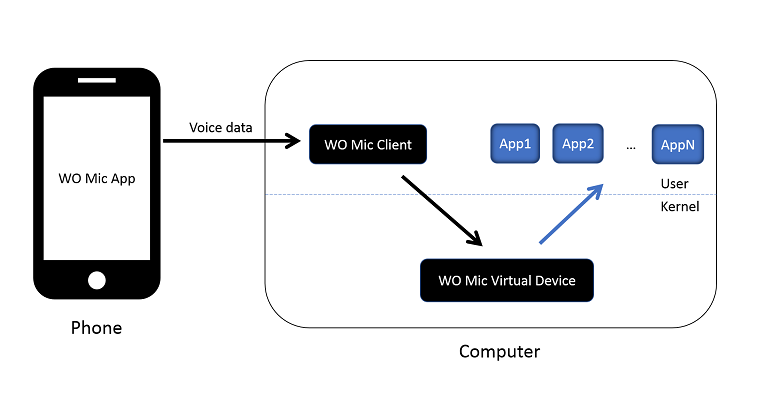
Phone to PC Audio Connection
Once installed, WO Mic works like this:
- Your phone captures your voice
- It sends audio to your PC
- PC receives it as microphone input
It’s like turning your phone into a wireless microphone system.
Connection Modes Explained
WO Mic supports three main connection types:
- Wi-Fi: Wireless and easy to use
- USB: Most stable and low delay
- Bluetooth: Convenient but slightly slower
USB is usually best for gaming and professional use.
Features of WO Mic
Wireless Microphone Support
WO Mic allows you to use your phone without cables (Wi-Fi or Bluetooth), giving you freedom to move while speaking.
Low Latency Audio
When using USB mode, WO Mic offers low delay audio, making it suitable for real-time communication like gaming or meetings.
Benefits of WO Mic Download
- Free to use
- No need for external microphone
- Works on most Windows PCs
- Easy setup process
- Portable and flexible
It is one of the best budget-friendly microphone solutions available.
Common Issues After Download
Problem: Mic not detected
- Install or reinstall drivers
- Restart PC
Problem: No connection
- Ensure both devices are on same Wi-Fi
- Check firewall settings
Problem: Audio delay
- Switch to USB mode for better performance
Best Uses of WO Mic
WO Mic is widely used for:
- Online classes
- Zoom and Skype meetings
- Gaming voice chat
- YouTube recording
- Podcast practice
It is especially useful when you don’t have a dedicated microphone.
Conclusion
The WO Mic download is a simple yet powerful solution for anyone who needs a microphone without spending money. By installing the app on your phone and the client on your PC, you can easily turn your smartphone into a working microphone.
It is easy to set up, highly flexible, and works well for everyday tasks like meetings, gaming, and recording. While it may not replace professional microphones, it is an excellent choice for beginners and casual users.
FAQs
1. Is WO Mic download free?
Yes, WO Mic is completely free to download and use.
2. Is WO Mic safe to install?
Yes, if downloaded from official sources like Play Store or official website.
3. Can I use WO Mic without internet?
Yes, USB and Bluetooth modes work without internet.
4. Why is WO Mic not working after download?
Check drivers, permissions, and connection settings.
5. Is WO Mic good for gaming?
Yes, especially USB mode for low-latency voice chat.
Go To Here: sistrology.org