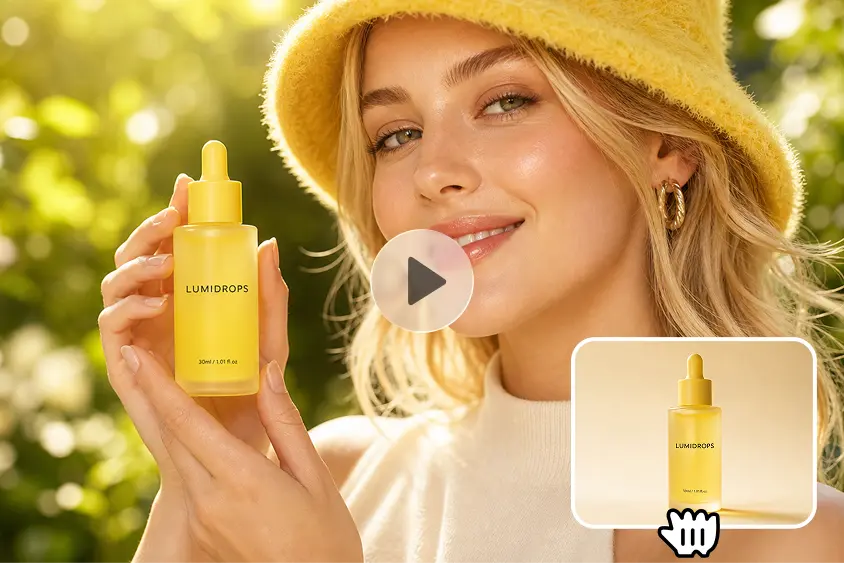
Podcast Cover Art can be seen outside of podcast directories. It also stands out for shows on social feeds, on video platforms, launch announcements, episode promotions, etc. Promotional clips are great for subtle animation, and static artwork can set up recognition. Podcasters can use Dreamina AI to generate short videos from reference images, eliminating the need for extensive recording sessions. It has models called Seedance that enable generated motion, camera motion, and creative visual direction. However, details, faces, logos, and lettering may be different in generated footage. Quality checks and careful prompting help ensure a consistent podcasting identity.
Why podcast cover art benefits from subtle movement
A moving cover is a great way to get people’s attention in podcast trailers, episode announcements, and launch countdowns. In contrast to making a complete podcast, animation will use existing artwork to create promotional content. With no need for complicated production, convert image to video online can add subtle camera motion, atmospheric lighting, or animated backgrounds. Dreamina AI offers a practical approach to experimenting with these effects for Reels, Shorts, TikTok, and other placements. The movement should be in support of the show’s personality and not in competition with the show’s name. Short and focused clips will also help listeners identify the podcast before they are met with further episode details.
Choose an animation style that matches the show’s personality.
The animation style should match the content of the podcast, emotion, and visual identity. Shows benefit from controlled camera movements and depth in the background, indicating thoughtful conversation. Slow push-ins and shifting shadows can be used in true-crime artwork without the introduction of fictional evidence. Comedy podcasts can do things like playful framing, lively transitions, and energetic visual accents. If you are creating an educational show, you want your transitions to be clean with readable graphics. Wellness podcasts can benefit from subtle light shifts and unobtrusive movement, while narrative shows can create suspense through the use of film-like lighting. While Dreamina AI lets you play with these directions, you can check the consistency and accuracy of the generated movements.
Prepare podcast artwork before generating video.
Start with the best original art possible and retain an original copy for comparison. Make sure the podcast title, host name, and podcast logo are legible in small print. Determine movable elements (e.g., illustrated scenery, background lighting, or shapes). Movement can be created with elements around the main, while the main itself stays fairly static to maintain recognition before generating; think about the aspect ratio and cropping of the destination. Artwork in square format might require some adjustments for vertical or widescreen formats. Particular attention should be paid to typography, as it can become distorted when a video is generated with individual letters, symbols, and brand marks.
How to animate podcast cover art with Dreamina’s image-to-video AI.
Step 1: Upload your cover art and describe the motion
- Sign up or log in to Dreamina first, then get your podcast cover art ready.
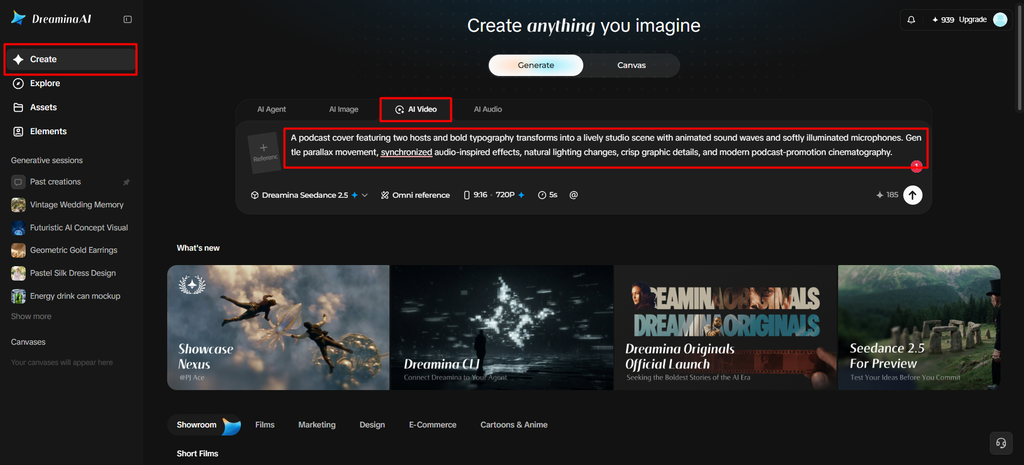
- Head to the “Create” tab in the left menu and select the “AI video” option.
- Enter a detailed text prompt about how you want your cover to look and feel. Add details on video elements, theme, and concept, like a pulsing waveform or drifting light.
Step 2: Pick a model and set the look
- Next, pick a model from the options sitting at the bottom of the dialogue box.
- Your options also include Dreamina Seedance 2.5, Dreamina Seedance 2.0, and Dreamina Seedance 2.0 Fast.
- Other available choices are Dreamina Seedance 2.0 Mini and Dreamina Seedance 1.0, among several others.
- Click on “Omni reference” and guide the AI with multiple reference images for accurate loops.
- Use the “Aspect ratio” and “Resolution” tabs to select a custom aspect ratio and resolution.
- Finally, click on the “Generate” tab and begin creating your animated podcast cover art now.
Step 3: Polish the loop and export
- If the motion feels off, you can “Edit prompt” or “Regenerate” to refine the results.
- You can also edit the generated video using the “Edit video” option for bigger changes.
- Moreover, you can use “Edit segment” to edit only one part of the video clip.
- Use “Extend video” to lengthen your clip, so your animation plays longer in each trailer. Apply “Creative upscale” to improve your video quality before you share it on any platform.
- Dreamina gives you complete freedom to edit your cover animation the way you like it.
- Finally, click on the “Download” tab present at the top right corner of the interface. This saves the video file on your local device, ready for easy sharing with listeners.
Write prompts that animate the artwork without redesigning it.
Effective prompts help to differentiate desired movements from those that should stay constant. Explain the direction of the camera, the tempo, lighting, atmosphere, background activity, and intensity of movement. Take out ambiguous directions like make it exciting and put in clear visual instructions. For instance, “slow cinematic push-in, gentle background light movement, preserve the original color palette, maintain the original composition. These instructions are used by Dreamina AI to guide the generation process, though prompts cannot ensure pixel-perfect preservation. Vary only one factor from one generation to the next to allow for easy comparisons. This allows you to determine an appropriate motion without repeatedly altering the overall visual direction.
Pair the visual with podcast audio and episode information.
Audio adds more clarity to a promotional purpose for animated artwork. Think about a short music sting, approved podcast clip, or a short narration that is in line with the tone of the show. In some workflows, Dreamina AI can handle audio-related features, subject to the availability and choice of the model and tools used. Once the animation is created, add all the necessary information in a separate editing process. Add episode title, guest name, date, or call to action as appropriate. Limit overlays to short text that is easy to read on mobile devices. Do not put the artwork over the focus, and check permissions for music and voice before posting.
Final quality checks before publishing
See the whole clip and not just the first shot. Ensure that the podcast title, logo, colors, and a central theme are consistent throughout. Look for distortion, changes in the face, flashing images, and movement that is distracting. To gauge both experiences, preview the video with sound and muted. Ensure captions and promotional overlays are still easily readable after platform cropping. Export an “appropriate” sized version and test it on the platform you will be using. Keep the original cover separate and label the animated version as a promotional asset.
Conclusion
Dreamina AI assists podcasters in creating cover art that has an active role in the promotional channels. Purposeful movement, ready-made art, specific prompts, and thoughtful editing produce a more regulated workflow. Seedance models offer the flexibility to investigate movement, and final checks can be used to determine inconsistencies created. There are still no frills about it: making podcast artwork more interesting without losing its podcast feel. A well-done animation helps reinforce the original design, makes key information easy to spot, and allows the show some continuity in its visual style.